Last updated 10 September 2026
The framing is wrong, and it is worth saying so before the table. Navigation Pro does not compete with Google Maps — it drives Google Maps, next to Apple Maps and Yandex Maps, and tells you which of the three is quickest today. If Google wins, Navigation Pro says Google and takes you there on Google's map.
Google Maps is a map of the world. It knows where the dentist is, when the supermarket closes, what the street looks like, how to get there on foot, by bike, by bus and by car, and what four hundred people thought of the coffee. Driving directions are one feature among dozens.
Navigation Pro does one thing. It takes a driving destination, asks three providers at once, lines up the three answers, and then navigates whichever one you choose. It has no reviews, no transit timetables, no business listings and no walking directions, and it is not trying to acquire any.
| Navigation Pro | Google Maps | |
|---|---|---|
| Driving ETAs shown | Three, side by side, from Google, Apple and Yandex | One, from Google |
| Turn-by-turn with voice | Yes, in three levels: off, alerts only, full | Yes |
| Change provider mid-drive | Yes — one tap, guidance continues from where you are | Not applicable |
| Alert when another provider is faster | Yes, with the number of minutes | Reroutes within Google |
| Walking, cycling, transit | No | Yes |
| Business listings, reviews, hours, photos | No | Yes |
| Offline maps | No | Yes |
| Street-level imagery | No | Yes |
| Toll cost for the route | Names the crossing where identifiable; no price | Priced in some countries |
| Platform | iPhone, iOS 18 and later | iPhone, Android, web |
| Price | Comparing is free and unlimited; starting navigation is limited before an optional weekly or yearly subscription | Free |
Google Maps is very good, and for most short drives the honest advice is to open it and go. The three providers usually agree within a few minutes across a city, and a comparison you did not need is a comparison that cost you ten seconds.
Add to that: everything is in one place. If the drive is really "find a hardware shop that is still open and then take me there", a comparison tool cannot help with the first half of that sentence.
The argument for comparing is not that Google is bad. It is that no provider can be strongest everywhere at once, and you cannot tell from inside one app which kind of road you are on today.
Each service estimates live speeds largely from the devices already driving those roads, so its picture of traffic is only as dense as its own user base on that particular stretch. Underneath that sits a separately maintained road model — speed limits, turn restrictions, closures — updated on each provider's own schedule. The result is that the same two points can produce answers minutes apart in one city and more than an hour apart on an intercity run. A single ETA never shows you that spread, because it has nothing to compare itself to.
Planning New York to Philadelphia at the same instant: Google 1 hr 39 min, Apple 1 hr 52 min, Yandex 3 hr 8 min — over near-identical distances of 94 to 96.5 miles. Thirteen minutes between the first two, ninety between the extremes.
Nothing here says Google was right. It says the gap existed, and only one of these apps was in a position to show it to you. Why the numbers diverge →
The feature that does not exist inside any single navigation app is the mid-drive switch. In Navigation Pro all three engines guide for the entire drive, not just the one on screen. Their live arrival times stay along the top, so you watch the gap open or close as you go. Tap another provider and guidance continues on its map from exactly where you are — nothing restarts, and the address is never retyped.
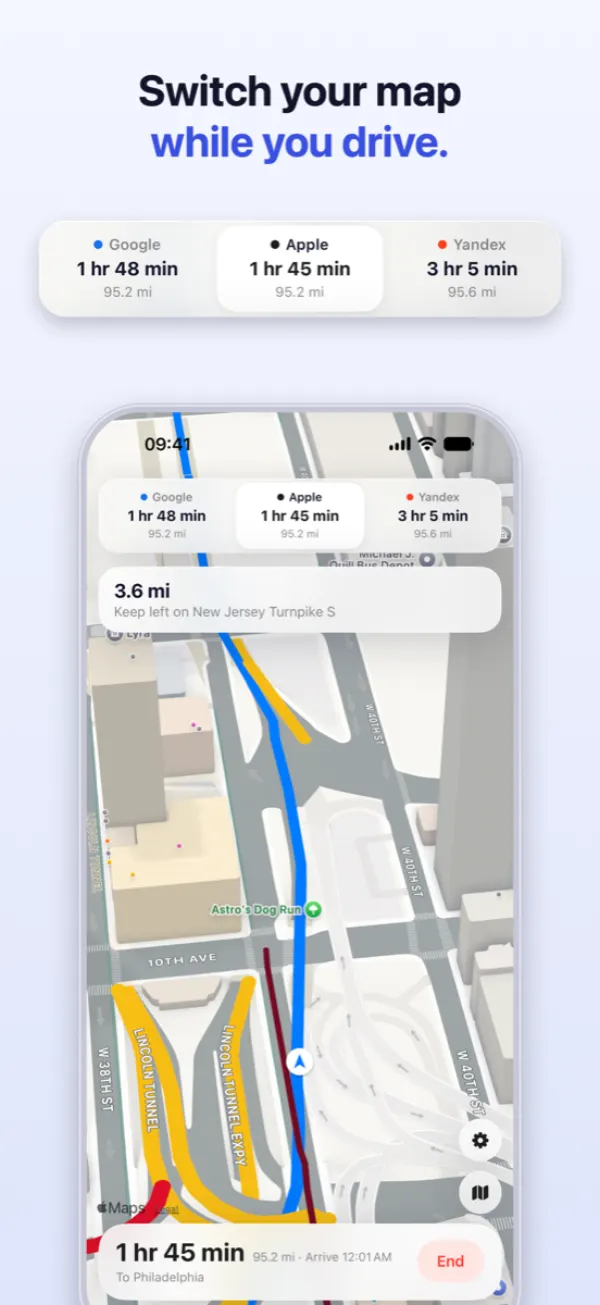
The same machinery produces the faster-route alert. Because the other two never stopped calculating, the app can tell you that one of them has become quicker and by how many minutes. "Thirteen minutes quicker" is a decision you can make at the wheel; "a faster route is available" is a nag. Nothing reroutes on its own — taking the faster map is one tap, and ignoring it is none.
Being straight about this is more useful than a marketing table:
Both, most likely, and not as rivals. Keep Google Maps for finding things and for every trip that is not in a car. Open Navigation Pro for the drive that matters — the long one, the unfamiliar one, the one where an hour of difference is hiding between three apps you would otherwise have to check by hand.
Comparing routes in Navigation Pro is free and unlimited, so the checking costs nothing but the tap.
One search goes to Google, Apple and Yandex together. Pick the one you want and turn-by-turn starts in the same app.
Download on theApp Store Navigation Pro