Last updated 10 September 2026
Ask Google Maps, Apple Maps and Yandex Maps to plan the same drive and you will often get three different answers. That is not a malfunction in any of them. It is what happens when three companies measure the same road with different instruments — and knowing the size of the gap is more useful than picking a favorite once and never checking again.
Here is a real capture from Navigation Pro, planning one route out of New York City toward Philadelphia. All three providers were asked at the same moment, for the same origin and the same destination:
| Provider | Arrival estimate | Distance | Traffic reading |
|---|---|---|---|
| Google Maps | 1 hr 39 min | 94 mi | Light |
| Apple Maps | 1 hr 52 min | 95.9 mi | Moderate |
| Yandex Maps | 3 hr 8 min | 96.5 mi | Light |
The distances agree to within about two and a half miles. The arrival times do not: thirteen minutes separate Google from Apple, and an hour and a half separates Google from Yandex. Nearly the same road, three very different predictions about how long it will take to drive it.
Every mainstream navigation service estimates current speeds partly from the devices already driving those roads. That means each provider's picture of traffic is only as dense as its own user base on that particular stretch of road, at that particular time. A provider with a strong following in one country will read a jam there minutes before a provider with few users on the same highway — and on a road where a provider has almost no traffic data, its estimate quietly falls back on typical speeds rather than today's.
An arrival time is not a measurement, it is a forecast about a driver. How fast does that driver take a on-ramp? Do they hold the speed limit exactly, or the flow of traffic? How long do they sit at an intersection? Each provider answers those questions with its own model, and each answer compounds. A difference of three miles an hour in assumed average speed is nothing over five miles and roughly fifteen minutes over three hours of driving.
Part of the gap is not the estimate at all — it is the route. Given the same two points, the three providers frequently choose different combinations of highway, ring road and surface street, weighing tolls, turn counts and road class differently. When two apps disagree by an hour, it is usually worth checking whether they are even sending you the same way.
Underneath the traffic layer sits a model of the road network: speed limits, turn restrictions, closures, which lane leads where. These are maintained separately by each provider and updated at different speeds. A road that reopened last month may already be in one map and still missing from another.
Across a city the three usually land within a few minutes of each other, and the choice barely matters. On a long intercity drive the spread can pass an hour — and that is exactly the trip where you would most like to have checked before setting off.
It is the wrong question, and the honest answer is unsatisfying: it depends on where you are driving and when. Each provider is strongest where it has the densest live data and the best-maintained road model, and that varies by country, by city and even by road type. A provider that is consistently sharpest on your commute may be the worst of the three on a holiday drive four hundred miles away.
What travels well is not a winner but a habit: before a drive that matters, look at more than one estimate. If they agree, you have lost nothing. If they disagree by half an hour, you have just learned something worth knowing while you can still act on it.
Checking three apps manually means typing the same address three times, reading three screens, remembering three numbers, and then going back to the one you decided on — by which time the traffic has moved on. Most people try it once and give up, which is reasonable.
That friction is the whole reason Navigation Pro exists. One search goes to Google, Apple and Yandex together, and the three answers arrive on a single screen with the quickest marked. You pick one and turn-by-turn guidance starts in the same app, on that provider's own map — nothing is handed off and the address is never retyped.
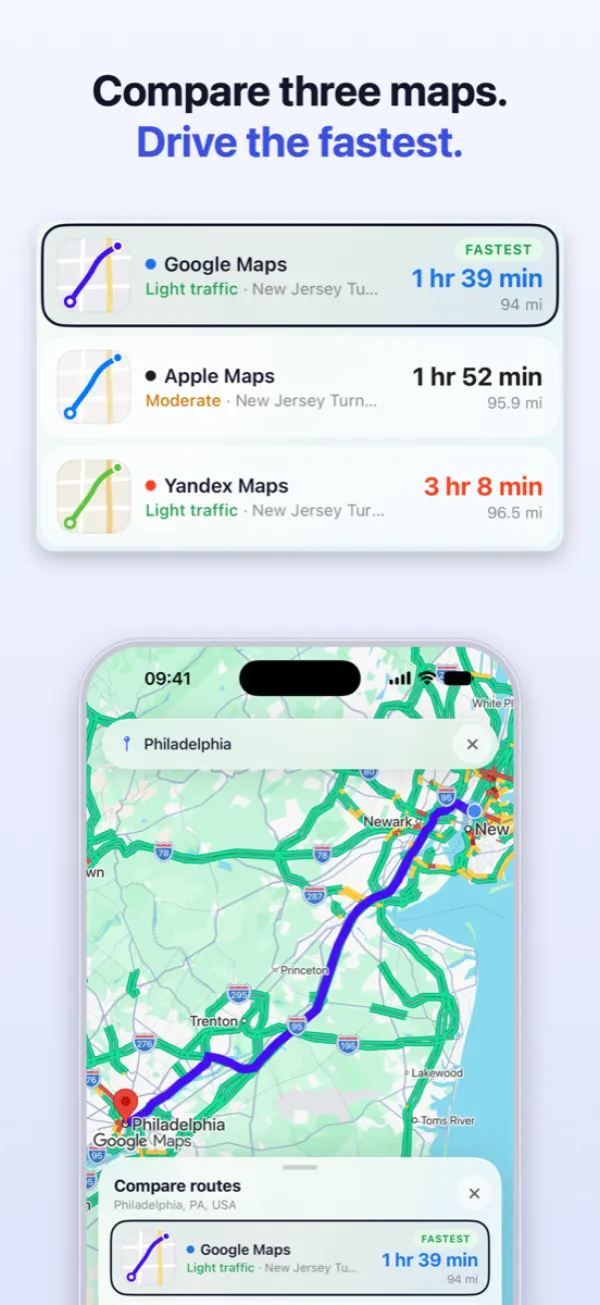
The comparison keeps running once you set off. All three engines guide for the whole drive, so their live arrival times stay visible at the top of the screen and you can switch to another provider's map mid-drive without restarting anything. If one of the other two becomes materially faster, the app says by how many minutes and leaves the decision to you.
Two honest limits, because a comparison tool that oversells itself is worse than none:
And the obvious one: an estimate made before you leave is a forecast, not a promise. The point is not that one of the three is right. It is that when they are an hour apart, you would rather know.
One search, three arrival times, and the drive starts in the same app. Comparing routes is free and unlimited.
Download on theApp Store Navigation Pro