Last updated 10 September 2026
Every navigation app will happily tell you the fastest route. The problem is that a single app has no way of telling you how confident it is — and its confidence is the part you actually need before a three-hour drive.
It is easy to read "1 hr 39 min" as a fact about the road. It is not. It is a prediction about a particular driver, on particular roads, in traffic that is still moving, built from three separate guesses stacked on top of each other:
A single number hides all three. Two numbers reveal the uncertainty, which is why the most useful thing you can do before a long drive is get a second opinion.
Not one app twice, ten minutes apart — that mostly tells you the traffic moved. Two or three providers, on the same origin and destination, at the same instant. If they agree, you have bought certainty for a few seconds of effort. If they disagree, that spread is the information.
This is the step most people skip, and it decides what kind of disagreement you are looking at.
| What you see | What it means | What to do |
|---|---|---|
| Similar distances, times far apart | Roughly the same road; the apps disagree about traffic. | Prefer the provider with the more pessimistic reading — a jam it can see is more reliable than a jam another cannot. |
| Distances far apart | Different roads entirely. You are choosing a route, not an estimate. | Look at what each one uses: highway versus surface streets, and whether a tolled crossing is involved. |
| All within a few minutes | Consensus. The choice barely matters. | Take any of them and stop thinking about it. |
Across a city the three providers usually land within a few minutes of each other, and chasing that is a waste of attention. On a long intercity drive the spread can pass an hour — because a small difference in assumed average speed multiplied by three hours of driving is no longer small, and because the providers may be sending you materially different ways. That is the trip where looking pays for itself.
Every estimate you compared was made before you moved. Twenty minutes in, the assumptions behind it have aged. If you can keep a second opinion running while you drive, a road that turns bad shows up as a growing gap between two numbers long before it shows up as brake lights.
On a commute, when you leave usually matters more than which road you take. Fifteen minutes either side of a peak can move an arrival time further than any route choice will. If you have flexibility over departure, spend it there first — then compare routes.
A navigation app can only compare its own candidate routes, scored by its own traffic model. When it says "fastest", it means fastest among the options it generated, according to the speeds it believes. There is no dishonesty in that — it is simply the only comparison available from inside a single system. What it cannot do is tell you that another provider, reading the same roads with different data, has arrived at an answer half an hour away.
Doing it by hand works and nobody keeps it up. Three apps means typing the address three times, holding three numbers in your head, and starting over when the traffic moves — which it does while you are still typing.
Navigation Pro was built around exactly this method. One search goes to Google, Apple and Yandex together and the three answers arrive on one screen, with arrival time, distance and traffic reading for each and the quickest marked — steps one and two, in a single tap.
Then it keeps going, which is step four. All three engines guide for the entire drive, not just the one on screen, so their live arrival times stay along the top and you can watch the gap change. If one of the other two becomes materially faster, the app tells you by how many minutes and leaves the decision to you. Nothing reroutes on its own.
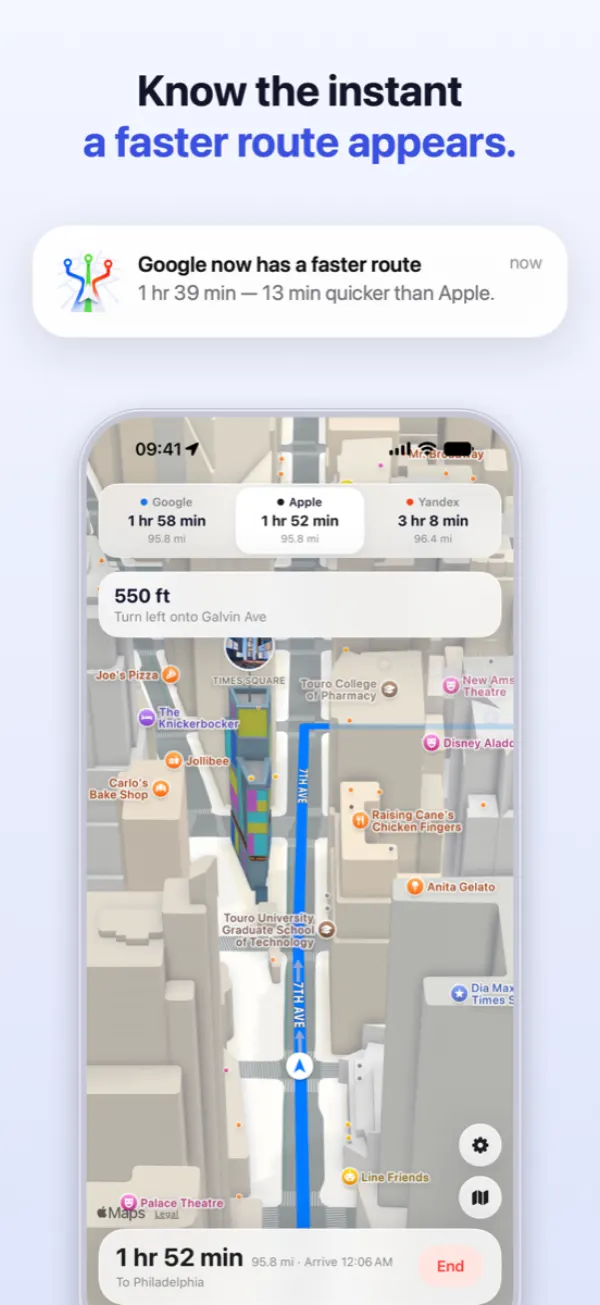
If you want to change your mind, tapping another provider continues the drive on its map from exactly where you are. Nothing restarts and the address is never retyped, which is the difference between a comparison you can act on and one you only get to make once.
None of this makes the forecast certain. It makes it honest: instead of one number that sounds sure, you get three that show you how much room there is to be wrong — while you can still do something about it.
Three arrival times on one screen, then turn-by-turn on whichever you choose. Comparing routes is free and unlimited.
Download on theApp Store Navigation Pro